Manga translator app for iPhone, iPad and Android
AI Manga Translator Read any manga in your language.
OpenManga is an AI manga translator for Japanese manga. It translates every speech bubble right on the page into 140+ languages, with the AI you choose, and the artwork stays exactly as the artist drew it.
Try it free. No sign-up needed: just jump in as a guest.


Tap a bubble to see the original line
Tap a language to translate this page
How it works
Translate manga with AI in three easy steps.
You add the pages. OpenManga does the rest.
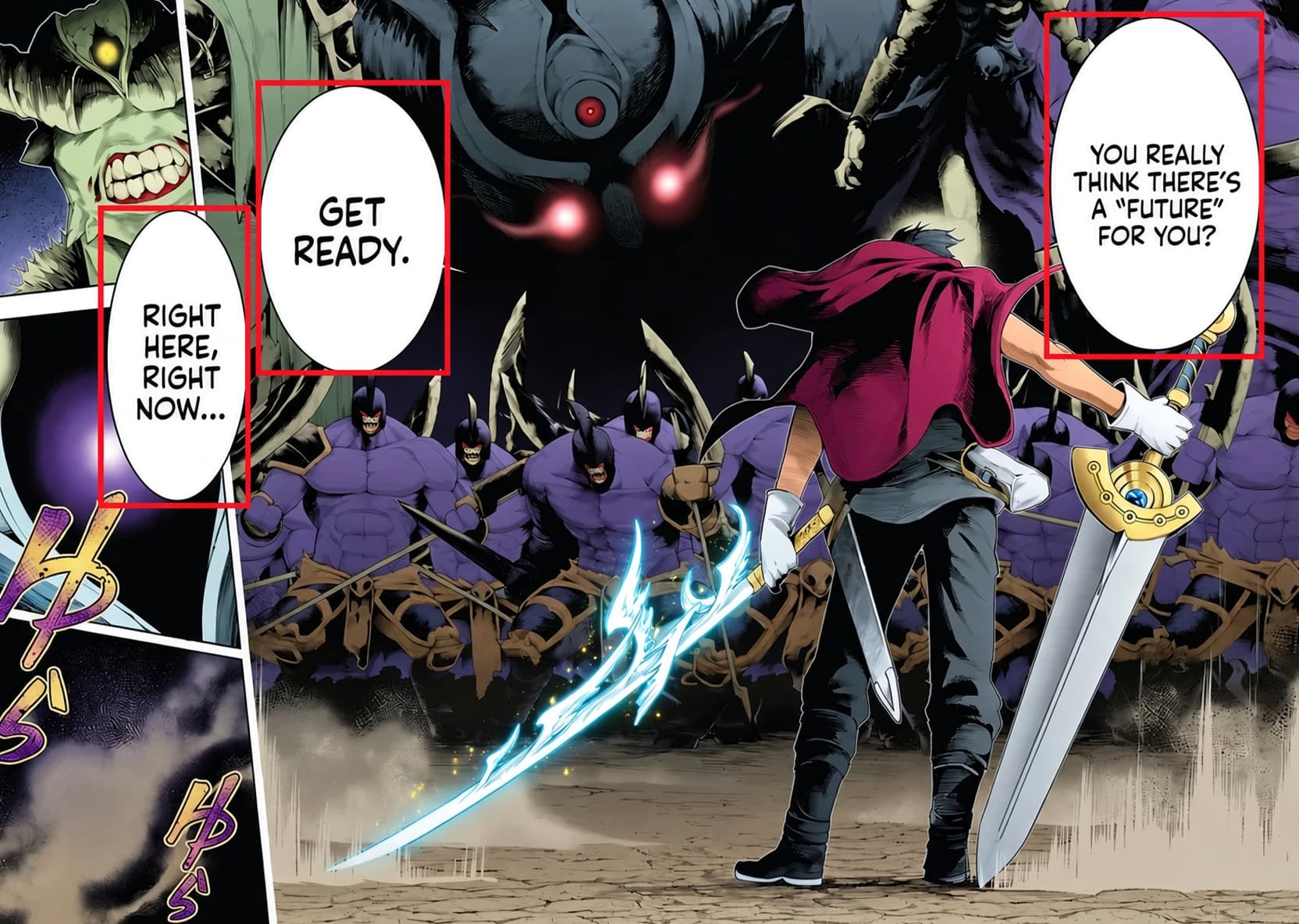
1It finds the words
It spots every speech bubble, caption and sound effect on the page, even in crowded, colorful artwork.
GeminiChatGPTClaudeDeepSeek2Your favorite AI translates
It reads each line in context, so the tone and who's talking come through.
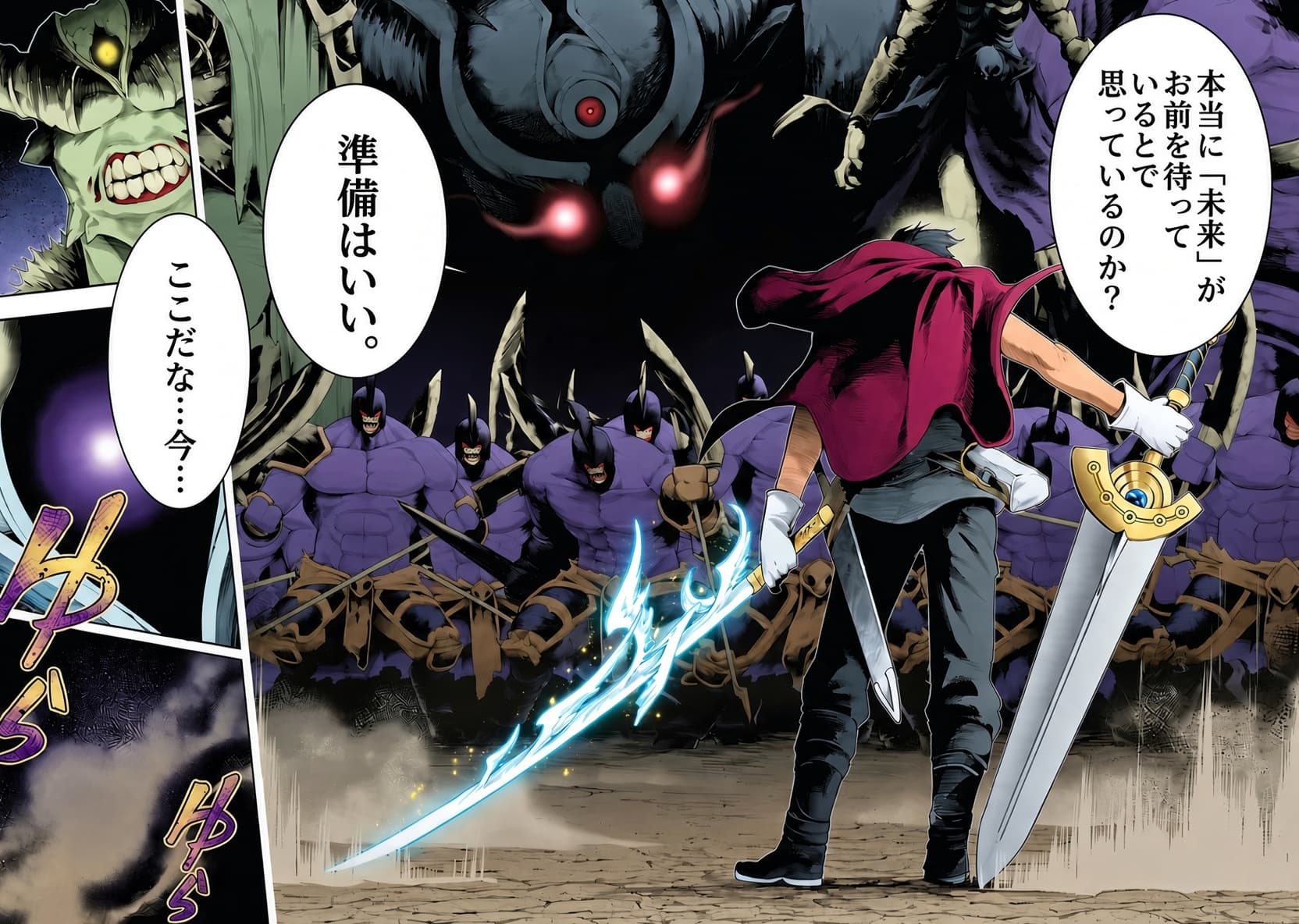
3The words go back on the page
The translation is placed right back in the original bubble. Everything else on the page stays untouched.
Inside the app
A calm place to read.
A clean, simple app that lets the manga take center stage. Tap a feature to see it on the phone.
Add pages from your photos, camera or files, up to 60 at a time. Choose your language and your AI right there, and see what it will cost before you start.
- PDFs and comic files (ZIP, CBZ) open right away
- Long scrolling comics are split into pages for you
- Tap a page to preview it, press and hold to rearrange
Pick from Gemini, ChatGPT, Claude, DeepSeek, Grok or Kimi. Each one has its own style, and you can see what it costs per page, from 1 to 5 credits, before you choose.
- Save your favorite in Settings
- Switch any time with one tap
Swipe through your pages and flip between Original and Translated. Tap any bubble to see the original line next to the translation, and which AI wrote it.
- Save any page to your photos
- Each page usually takes just 10 to 20 seconds
Tap play and a character voice reads the line out loud: the original in Japanese, or the translation in your language. Meet gentle Haruka, bright and bubbly Mirai, hot-blooded Taiga and cool Shizuka.
- Nine voices to choose from
- Hear a voice before you pick it

What are we reading tonight?
More to love
Made for the way you actually read manga.
Whole chapters at once
Add up to 60 pages in one go from your photos, camera or files. PDFs and comic files (ZIP, CBZ) open right away, and long scrolling comics are split into pages for you.
Share from any app
Found a page in your browser or your Files app? Tap Share, then OpenManga, and it's ready to translate.
The artwork stays untouched
Only the words change. Everything else stays exactly as the artist drew it, and you can flip back to the original page any time.
Made with fans in mind
Little touches like -san and -senpai are kept, names stay in Japanese order, the dialogue sounds natural, and sound effects get translated too.
Pay only for what you use
You always see the price before you start. If a page doesn't work, your credits come back automatically. Members also get free credits every day.
Light, dark, your language
Matches your phone's light or dark mode, or stays on the one you pick. The app itself speaks 16 languages, including English, Español, 日本語 and 한국어.
Your AI
Choose the AI that translates your manga.
Each AI has its own style. Pick a favorite, switch whenever you like, and see the price before you start. A page costs 1 to 5 credits.

Gemini
GoogleGoogle's newest, fast AI
2 credits a page
ChatGPT
OpenAITop quality from OpenAI
4 credits a page
Claude
AnthropicGreat for tricky pages
5 credits a page
DeepSeek
DeepSeekQuick and budget-friendly
1 credit a page
Grok
xAIGrok, from xAI
2 credits a page
Kimi
Moonshot AIKimi, from Moonshot AI
2 credits a pageChatGPT, Claude, Gemini, DeepSeek, Grok and Kimi are trademarks of their respective owners. Prices are shown in the app and may change.
Languages
Translate manga into 140+ languages.
Pick your language when you add pages, or save a favorite in Settings. Little touches like -san and -senpai stay just as they are.
Plus 130+ more, including
- 日本語
- 繁體中文
- Español (Latinoamérica)
- Português (Portugal)
- Русский
- العربية
- Türkçe
- Українська
- Nederlands
- Bahasa Melayu
- Filipino
- हिन्दी
What is OpenManga?
OpenManga is an AI manga translator app for iPhone, iPad and Android. It finds the speech bubbles, captions and sound effects on each page, translates them with the AI you choose, and puts the translation back on the page. The artwork stays untouched.
How do I translate manga into English?
Add your pages from photos, the camera or files (a PDF, ZIP or CBZ opens a whole chapter), pick English as your language, choose an AI and start the translation. English is one of 140+ languages, so the same steps work for Spanish, French, Korean and more.
Is OpenManga free to use?
You can try it for free: download the app, jump in as a guest, and you get some free credits to start. After that a page costs 1 to 5 credits depending on the AI, and you always see the price first. Members also get free credits every day.
Which languages can it translate manga into?
More than 140, including English, Español, Français, Deutsch, Português, Italiano, 日本語, 한국어, 简体中文 and 繁體中文. The app itself also speaks 16 languages.
What can OpenManga translate?
Japanese manga pages: speech bubbles, captions and sound effects. The translation goes right back onto the page. Add pictures from your photos, camera or files, or open a whole chapter from a PDF, ZIP or CBZ file.
Which AIs can I choose from?
Gemini, ChatGPT, Claude, DeepSeek, Grok and Kimi. Pick one each time, or save a favorite in Settings. The stronger ones cost more credits per page, and you see the price before you start.
How do credits work?
Credits are what you use to translate pages, and you get some free to start. A page costs 1 to 5 credits depending on the AI, and you see the total before you begin. If a page fails, your credits come straight back. Subscribers also get monthly credits plus a little extra every day.
Does it change the artwork?
No. Only the words inside the bubbles and the sound effects are replaced. Switch back to Original any time to see the page exactly as it was published.
Can it read the dialogue out loud?
Yes! Tap a bubble, then play the original or the translation in a character voice like Haruka, Mirai or Taiga. Everyone gets a daily allowance of new lines, and members get more.
Do I need an account?
Nope. Jump in as a guest to try it, then sign up later with Apple, Google or email and keep your credits and history.
Is there an Android version?
Yes. OpenManga is on the App Store for iPhone and iPad, and on Google Play for Android phones and tablets.
Every page, in your language.
Get it for iPhone, iPad and Android.